Case Study
Apple's Tap-to-pay Analysis
This is a group research project I worked on for my master's in Human Computer Interaction and Design at the University of Washington, for the UIST course.
- My Role
- Researcher on a team of three
- Timeline
- January 2024
Explanation
Contactless payment has evolved considerably since Mobil Oil first introduced Speedpass in 1997, with global adoption escalating in recent years. Countries such as Japan and South Korea showcased extensive usage before the United States. The advent of NFC technology led to Google Wallet (2011) and Apple Pay (2014), with COVID-19 accelerating widespread global adoption by 2020.
In this SWOT analysis, we have chosen to focus on Apple Wallet's tap-to-pay experience and functionality on the iPhone under the topic of graphic user interface. This tap-to-pay feature enables contactless payments from credit or debit cards stored in Apple Wallet without any additional terminals or hardware. Although tap-to-pay can be used across Apple devices, we focus this analysis specifically on the iPhone user experience. The tap-to-pay functionality involves both merchants and buyers. We have defined the scope of this analysis from the buyer perspective.
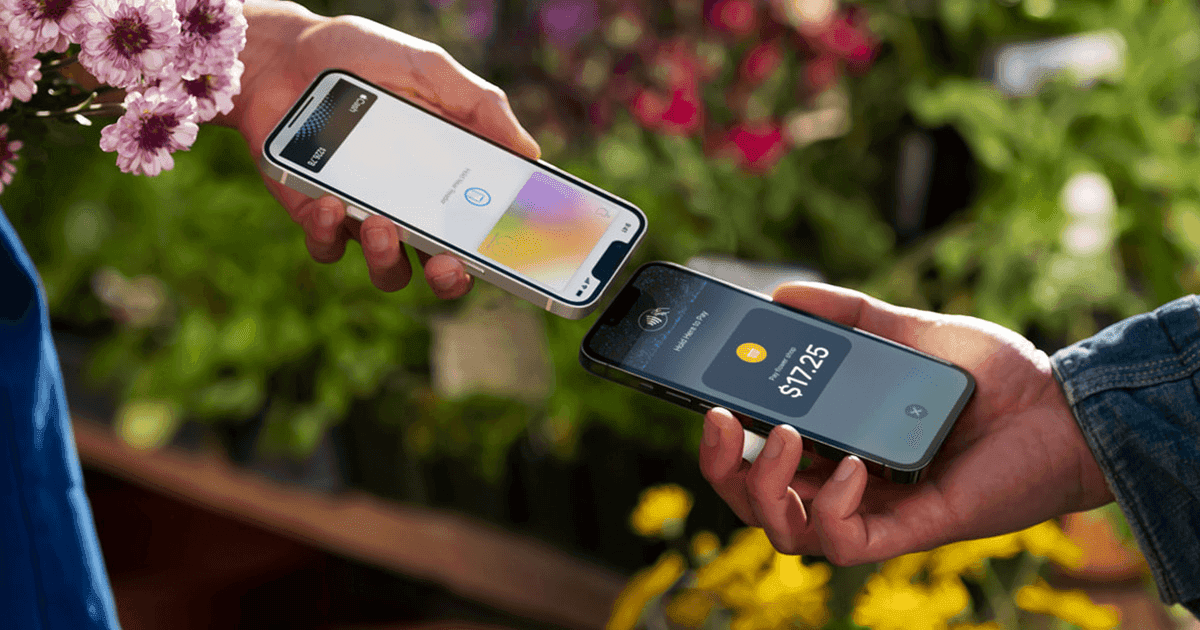
To initiate a payment in Apple Pay, the users double click the side button, authenticate with Face ID or passcode to open Apple Wallet, and hold the top of their iPhone near the contactless reader until the transaction is completed.
Tap to pay offers four key advantages:
- Enhanced security through dynamic security codes tied to each transaction
- Privacy, as Apple doesn't store original card details
- A faster, lighter, phone-only payment experience
- Intuitive interface with audio/haptic feedback
In conclusion, the tap-to-pay feature presents an excellent solution for digitizing and providing alternative payment methods to traditional credit or debit card chip and PIN transactions.
Nevertheless, Apple's tap to pay makes various assumptions about users' abilities. The assumptions section details exclusivity issues and assumptions posing barriers to broader accessibility.
There is an integration of 3 key technological components that we will define: NFC, Secure Element, and Secure Intent.
Key Technology Components
NFC (Near Field Communication)
Near Field Communication is a contactless technology that wirelessly shares information over a short distance between the POS Terminal (NFC Reader) and the credit cards (NFC Tag). The tap-to-pay functionality leverages NFC to dynamically create NFC Tags with payment information on the user's device.
Secure Element
Secure element is an industry-standard, certified chip designed to store sensitive payment data safely on users' devices. When users add their card to the wallet, the Secure Element, residing on the device, tokenizes and secures critical information like the Primary Account number (PAN).
Secure Intent
It is a secure initiation through which the authentication process ensures that the subsequent transaction is authorized by the legitimate device owner via passcode or FaceID.
Tap-to-Pay Process Explained
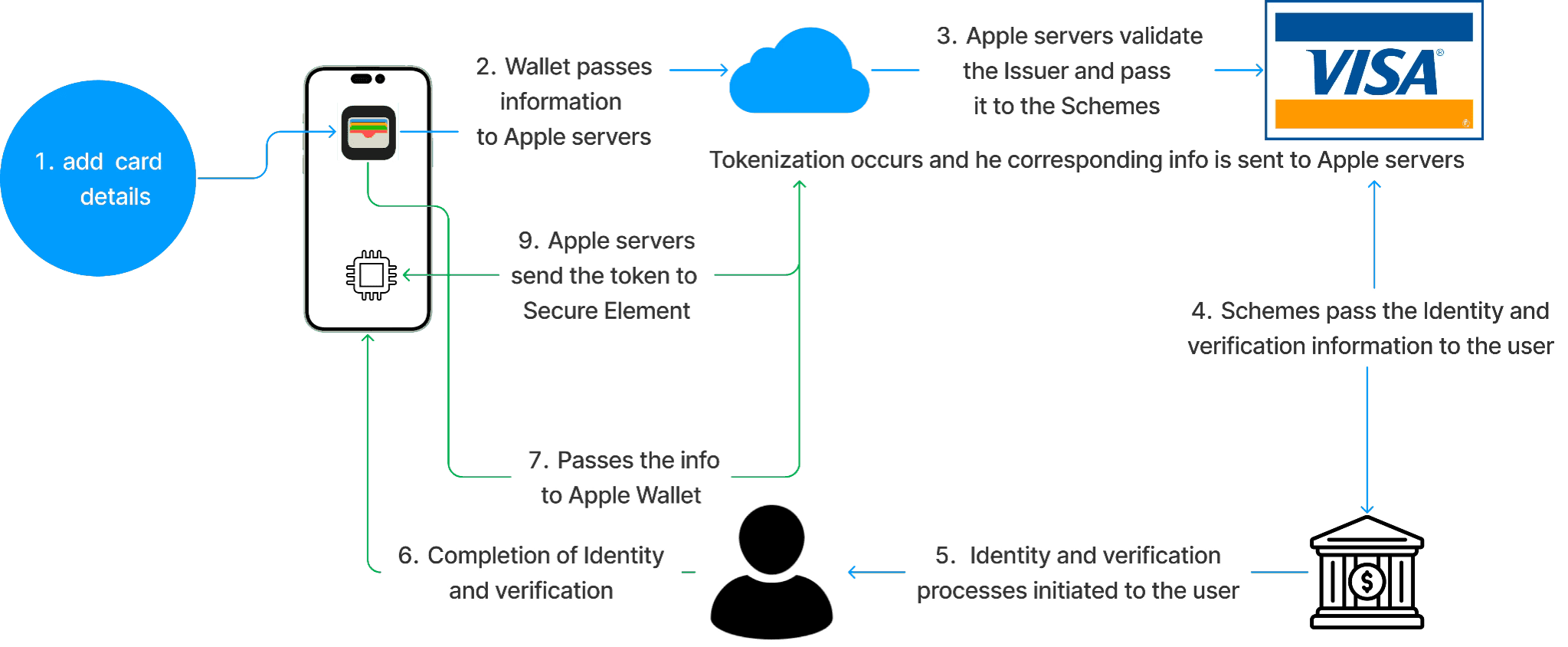
The entire process begins when the user adds their card to their Apple Wallet. The sensitive payment data secured by the Secure Element on the device is never shared to the merchant upon payment. The sensitive information is only shared with the merchant's Payment Service Provider, the User, and the card issuer (Apple Inc., 2022, p. 145).
When a payment is initiated the device uses its Secure Intent verification process (FaceID, TouchID, PIN) for authentication before beginning the tap-to-pay process. After the user is authenticated, the device encrypts and signs the card information stored on-device. This encryption process ensures that the data can only be read by parties with a decryption key, and the signing process is a guarantee that the data was really made by who it says it was and has not been altered (Wyro, 2018).
The encrypted and signed data is shared with the POS Terminal via the NFC, and remains encrypted until it reaches the Payment Service Provider. The Payment Service Provider requests a decryption key from the "Tap to Pay on iPhone" server hosted by Apple, which only provides it after verifying the data has not been tampered with, and that the data was read within the last 60 seconds. This entire process guarantees that only the Payment Service Provider and the User's device ever have access to this sensitive data (Apple Inc., 2022, p. 146).
This makes it much more secure as compared to a regular credit card swipe, which shares static data that stays the same every time, making it susceptible to replay attacks. A malicious actor can acquire the swiped information once, and replay that information repeatedly to make fraudulent purchases.
Assumptions
Ability to Tap/Gesture
- Users have the motor ability to perform the double click gesture.
- Users have the motor ability to tap their phone on the POS terminal.
- Users have good enough eye-sight to be able to use tap-to-pay. Or the ability to change text size/adjust fonts (for visually impaired).
- Eyes for face ID (although there's an alternative: a passcode).
Comprehension
- Cognitive ability to understand that tap-to-pay still pays with their personal cards and not Apple
- Cognitive ability to understand difference between Apple Wallet, Apple Pay, Apple Cash and Apple Card
- Ability to read, comprehend, and have sufficient digital literacy.
- Ability to follow Instructions (during the setup).
- Familiarity with iOS and the ecosystem.
- Cognitive ability to remember passcode
Trust
- Trust in Apple's Security
- Trust in Banks
- Trust in tap-to-pay functionality and security
- Comfortable with sharing payment information
Phone Capacity / Technology
- Electricity for charging the device (consistent)
- NFC Capabilities
- Owns an iPhone/iPad/watch/Apple product
- Access to App Store
- Regularly update the software
Location Limitation
- Has permanent housing
- Location services enabled
- Apple Wallet: where NFC is enabled
- Apple Wallet: works in the location
Financial Ability and Bank Related
- Financially capable to afford a phone
- Has money in your bank account
- Owns credit, debit, prepaid, or transit cards (a lot of people just use cash)
- Has bank accounts
- Bank is eligible to use Apple Wallet
Confidence, Preference, and Convenience
- Perception of convenience or safety over conventional cards
- User is knowledgeable to know which POS terminals accept the payment method.
Scenarios and Redesigns
Know Where to Tap: Apple Wallet ReDesign
Assumption: The assumption is that users will know if a retailer accepts tap to pay.
Scenario of Exclusion: User attempts to pay with Apple Tap to Pay, but the purchase fails. User enters a retail store assuming tap to pay is accepted. After selecting items and reaching the cashier, the tap doesn't work. The cashier informs them of the non-acceptance, leading to surprise and frustration. Without an alternative payment method, the user leaves without the purchase.
Feelings: Surprise, frustration, embarrassment.
Alternative Design
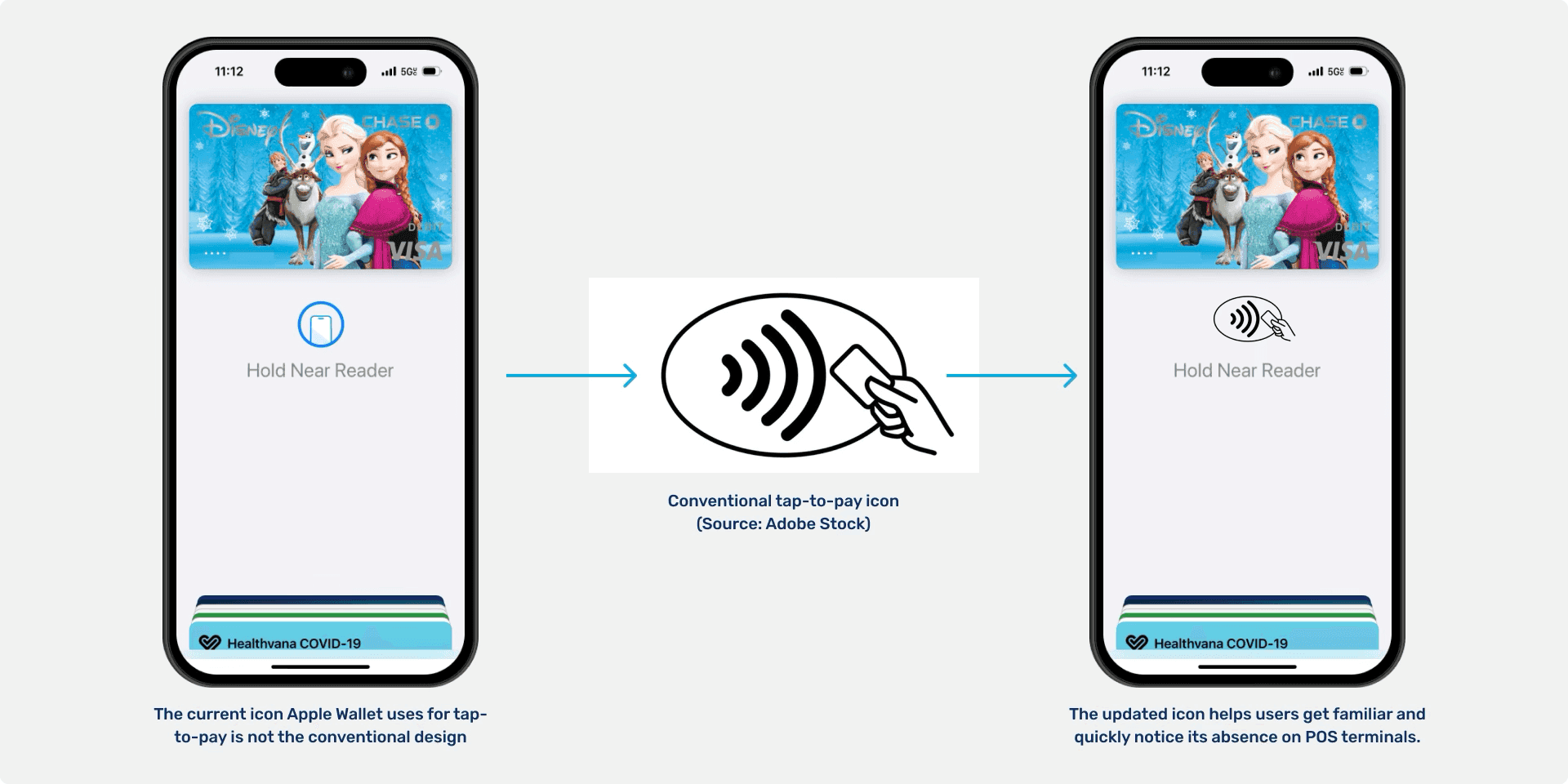
Consistent Iconography: Apple Wallet should adopt the universal tap-to-pay icon on its interface, aligning with physical payment terminals. If the user sees this icon enough, they may recognize the absence of the icon during payment, prompting confirmation beforehand. This redesign aims to inform users about retailer acceptance of tap to pay, assuming they will notice the icon in their Apple tap-to-pay experience.
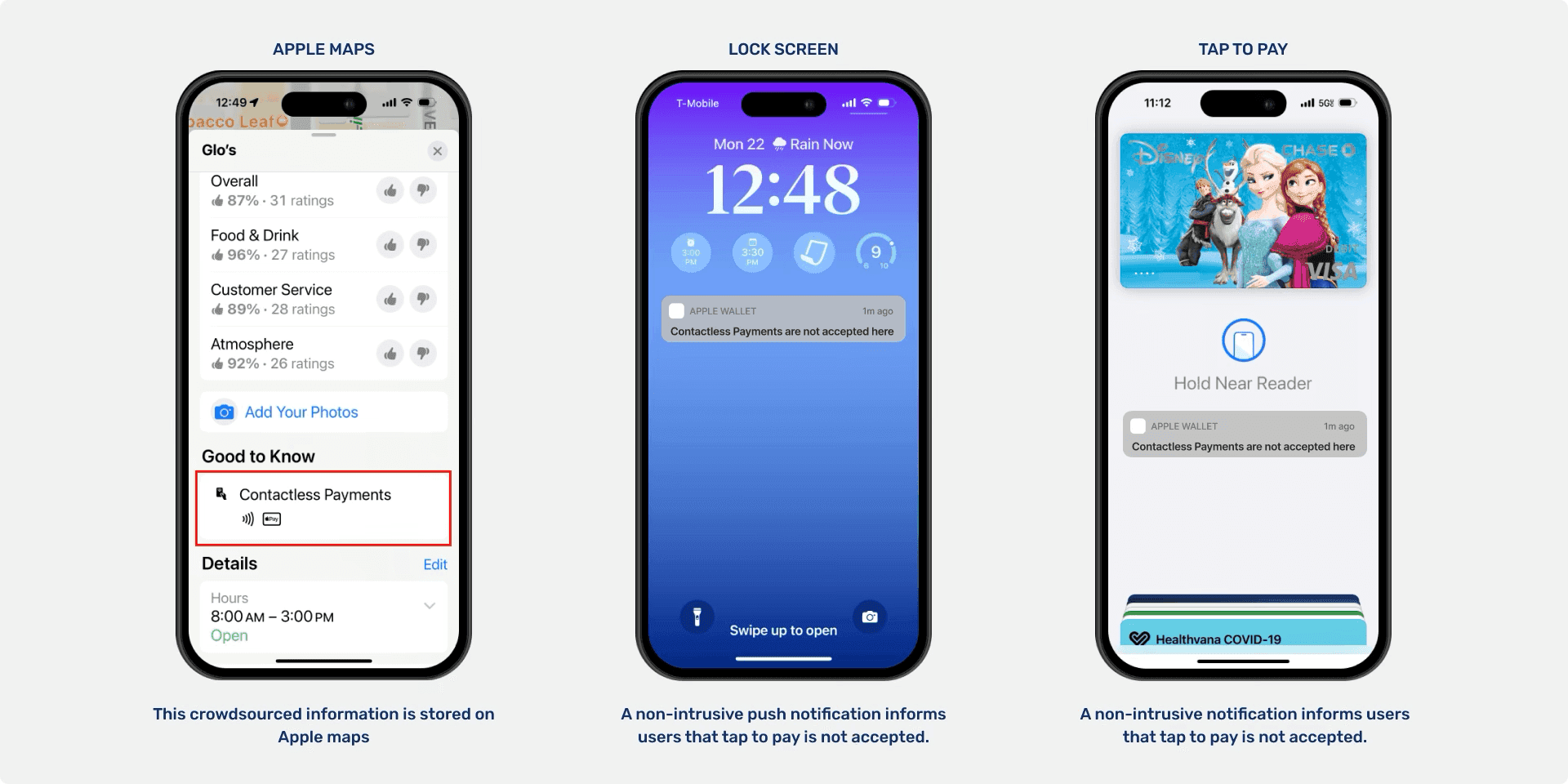
Proactive Notification: As Apple Wallet is already aware of the user's location and intent to make a purchase, they could crowdsource this information. Users receive a non-intrusive push notification or on the Apple Wallet screen indicating whether tap to pay is typically accepted at the specific retailer. This information, sourced from Apple Maps, serves as a proactive reminder for users to check their payment method or make alternative plans. This redesign also aims to inform users about tap-to-pay acceptance at retailers, assuming they will appreciate notifications about this.
Redesign Limitations
- Consistent Iconography: Using the universal tap-to-pay icon may not strongly link it to tap-to-pay for users. Also, intervening closer to payment might be too late for a helpful reminder.
- Proactive Notification: The user may turn off notifications, find them annoying, or rely on potentially outdated crowdsourced information that may impact the effectiveness of the proposed features. Similar to the previous, intervening closer to the time of payment might be too late for an effective reminder.
References
- Apple Card, Apple Cash, Apple Pay - Explained in 5 min! https://www.youtube.com/watch?v=ybTOTMlMTf8&t=2s
- Apple Inc. (2022). Apple Platform Security. https://help.apple.com/pdf/security/en_US/apple-platform-security-guide.pdf
- Apple Inc., Using the Apple Support website. Apple Support. https://support.apple.com/en-us/102534
- Wyro, B. (2018, May 29). Encrypting vs. signing with OpenPGP. What's the difference? MDaemon Technologies. https://blog.mdaemon.com/encrypting-vs-signing-with-openpgp-whats-the-difference
- Apple Inc., Tap to Pay on iPhone https://developer.apple.com/tap-to-pay/
- Apple Inc. (2023) Apple Pay & Privacy https://www.apple.com/legal/privacy/data/en/apple-pay/
- Apple Inc. (2023) Get Started with Wallet. Apple Developer. https://developer.apple.com/wallet/get-started/
Appendix — Context and Definitions
- Apple Wallet: Apple Wallet is an app on iOS devices for storing tickets, cards, and making payments through Apple Pay. It incorporates the rest of the terms used here.
- Apple Pay: Apple Pay is simply the process of making the payment. It is a mobile payment service integrated into Apple Wallet, allowing secure and contactless transactions with added credit or debit cards.
- Apple Cash: Apple Cash, within Apple Wallet, facilitates peer-to-peer money transfers, enabling users to send and receive funds via iMessage or Siri. One can load money into Apple Cash and pay directly without having to use any card.
- Apple Card: Apple Card is a credit card issued by Apple and Goldman Sachs, accessible through the Wallet app, offering features like Daily Cash rewards and a titanium physical card.